How to Fix Stringing Issues in 3D Prints?
3D printing has revolutionized the way we prototype, create, and manufacture objects, but it also presents
some challenges. One of the most common problems faced by both beginners and experienced 3D printing
enthusiasts is stringing.
Stringing occurs when the print head moves to different areas during the printing process, sometimes oozing
out molten plastic that then solidifies and adheres to the printed part. This is the phenomenon of 3D printing
stringing, which leaves fine strands of plastic on the 3D printed part, resembling cobwebs or strands of hair.
In this article, we will delve into the causes of stringing and how to easily resolve this issue to achieve smoother,
cleaner prints. Whether you are a hobbyist or a professional, understanding how to address stringing is crucial
for obtaining the best printing results with your 3D printer and materials.
What causes stringing in 3D printing?
Stringing refers to the phenomenon where the 3D printer nozzle fails to fully retract the filament when moving
between two parts of the print. As the nozzle moves across the print, a small amount of melted filament oozes
out and forms thin strings. These strings eventually attach to the printed object, causing defects that can affect
both the appearance and functionality of the object.
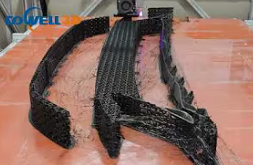 (Like this)
Common causes of stringing include:
Incorrect retraction settings:
If your 3D printer's retraction is insufficient or occurs too late, stringing will occur.
Excessively high printing temperature:
Temperatures higher than necessary cause the filament to remain more fluid, leading to unwanted oozing.
Excessively low printing speed:
Printing too slowly increases the amount of material extruded, exacerbating stringing.
Filament type:
Different filaments, such as PLA, PETG, or ABS, have different properties. Some materials are more prone to
stringing than others.
How to Solve Stringing Problems in 3D Printing?
Now that we understand the causes of stringing, let's look at how to actually reduce or eliminate it.
1. Adjust Retraction Settings
Retraction is the process of pulling the filament back when the print head moves between different areas.
Incorrect retraction settings are a major cause of stringing. To solve stringing problems, follow these steps:
Increase retraction distance: In your slicing software, increase the retraction distance (typically 4-6 mm for
Bowden extruders and 1-2 mm for direct-drive extruders).
Increase retraction speed: Try setting the retraction speed to around 40-80 mm/s. This helps to retract the
filament faster, reducing the likelihood of oozing.
Of course, these numbers are not constant and can vary depending on many variables.
2. Lower the printing temperature
Printing at too high a temperature can cause the filament to flow out of the nozzle too quickly, resulting in stringing.
For most filaments, lowering the temperature by 5-10°C can help reduce stringing:
These are the commonly recommended nozzle temperatures for some of the most popular filaments:
PLA: Printing temperature: 190-220°C
PETG: Printing temperature: 220-250°C
ABS: Printing temperature: 230-270°C
Please try different temperatures to find the optimal temperature range for your filament.
3. Increase Travel Speed
Some speed settings can also affect 3D printer stringing. If, for example, your nozzle takes too long to move between
two points, stringing is likely to occur because molten plastic has more time to ooze out of the nozzle. But if the
printhead can travel faster, it may be quick enough that the filament won’t have enough time to ooze.
Generally, a speed of 150 to 200 mm/s is suitable for most printing materials. DOwell 3D's printers, designed and
developed by the company, boast printing speeds of 150-500 mm/s, perfectly compatible with all printing filaments.
4. Clean or Replace the Nozzle
Prolonged use of a 3D printer, especially when using a single type of filament (such as PETG), can leave a thin layer
of residue on both the inside and outside of the nozzle. This residue can cause stringing as the filament attempts to
adhere to the surface of the printed object.
Nozzle cleaning steps:
Heat the nozzle to the printing temperature.
Wipe to remove external residue.
Use a cleaning needle to clear internal blockages.
Use the cold pull method (atomic method) to remove any remaining residue from the previous filament.
If stringing persists, replace the nozzle – worn nozzles often experience unpredictable filament leakage.
For more detailed instructions, please contact us.
5. Use high-quality filaments and ensure they are dry.
Low-quality filaments often have uneven diameters and contain impurities, leading to unstable performance and
stringing issues. To avoid this, always use high-quality filaments from reputable brands (such as Dowell 3D) to
ensure a smooth and stable extrusion process.
Conclusion
Stringing is a common but solvable problem in 3D printing. By adjusting retraction settings, optimizing printing
temperature, and using appropriate filament, you can eliminate stringing and achieve the high-quality prints you
desire. Remember that every printer and filament performs slightly differently, so don't be afraid to experiment to
find the settings that work best for your needs.
If you're looking for a top-tier 3D printing solution, consider DOWELL3D for your next project. With 11 years of experience
and a commitment to quality, we offer high-performance filaments and reliable 3D printers designed to elevate your
printing experience to a new level.
If you want to know more about the DOWELL 3D printer, please contact us or leave a message, and we
will explain it to you in detail.